Managed Print Solutions
Air Copier Systems Ltd provides complete managed print solutions designed to give you control over your organisations printing. As an authorised seller and implementer of uniFLOW Online, PaperCut MF and Cloud Connector we provide tailored solutions that can enhance security, improve efficiency and reduce costs.
Our expert team ensures every solution is implemented seamlessly, creating a smooth user experience that fits effortlessly into your business. You’ll wonder why you didn’t make the switch sooner.
Speak to our sales team today to learn more.
uniFLOW Online
What is uniFLOW Online?
uniFLOW Online is a cloud-based print management solution providing organisations the ability to centrally manage their printing, scanning and document workflows.
Whether staff are in the office, working from home or across multiple sites uniFLOW Online ensures every job is secure, tracked and only released when the right person is standing at the device.
Built on Microsoft Azure uniFLOW Online integrates natively with Microsoft 365, Active Directory, Google Workspace and major cloud platforms such as OneDrive, Google Drive and Dropbox.
The process
1
User sends a print job
Jobs are submitted to the uniFLOW cloud from the user’s device (Desktop, laptop or mobile phone)
2
Job is held in secure queue
The document is encrypted and stored in the user’s personal cloud queue
3
User Authenticates
User identifies themselves at the device via a pin / ID card or badge and selects the job to print
4
Usage is logged
Every job is tracked against the user / department / cost centre for easy reporting
Why choose uniFLOW Online?
No on-site servers
With uniFLOW Online being cloud based this completely eliminates the costs and complications of having a local server
Print from anywhere
Users can securely print from anywhere whether this is from a range of sites, home or a different country all from any device
Reporting
Admins can track and generate reports of users / departments usage or costs in detailed dashboards and reports
Secure print release
All prints remain in the users secure personal print queue until they physically authenticate themselves at the device
Cost saving
Users / departments can be set print limits as well as printing defaults such as duplex or mono printing
Scan to cloud solutions
Scan directly to cloud solutions such as OneDrive, Google Drive and SharePoint
Summary
uniFLOW Online can integrate seamlessly into any size of organisation across sectors. From small / mid-sized businesses that have removed the burden of having an onsite server but still require a secure and reliable print management solution up to multi-site organisations whether this be nation / worldwide. Places such as schools or universities which the users can be allocated a set budget to help avoid waste or places which the general public may be able to access the device such as a hospital uniFLOW Online locks the device down to prevent any unwanted access.
uniFLOW Online is a consistent winner of the BLI Pick Award having won it for an eight consecutive year. “uniFLOW Online delivers the modern, cloud-managed experience organizations expect, with security and usability that are second to none,” said Keith Haas, Solutions Analyst in Keypoint Intelligence’s Workplace Group. “Its centralized cloud administration with Remote Device Access, a dedicated macOS Device Access Client, and secure external support streamlines troubleshooting and hardware control across Canon fleets. IT teams can resolve issues and update configurations remotely, saving time and travel while maintaining consistent uptime across locations.”
Speak to our sales team today to see how uniFLOW Online can streamline your workflow.
PaperCut
What is PaperCut?
PaperCut is a print management solution designed to give organisations complete visibility and control over their printing, scanning and copying. Compatible across all major manufacturers and operating systems PaperCut can integrate into any organisation’s workflow.
With use in over 195 countries, 100 million plus users and proven cost savings of 30% PaperCut has established itself as a reliable solution across a huge range of sectors.
PaperCuts key features
Cost control
Budgets can be set for users / department / projects to help avoid any waste
Advanced scanning
Scan to email, folder and cloud solutions such as OneDrive and SharePoint all with OCR recognition
Secure print release
Jobs are held until the user authenticates at the device with a pin or card
Bring your own device
Mobility print allows users to print instantly from their personal devices, guest printing can also be setup by the admin
Environmental impact
In addition to secure print release and cost control to help save paper + toner by preventing any unnecessary printing the admin can see the environmental impact on the PaperCut dashboard.
Environmental statistics shown are:
- Trees worth of paper used
- Carbon emitted to produce the paper used
- Energy used to produce the paper used

Who is PaperCut good for?
With Papercut’s ability to support unlimited users and easy to use interface from day one makes it the perfect fit for users in any sector.
Schools / Universities
Allocate print budgets for students to enforce responsible printing across your campus network.
Hospitals / Clinics
Protect patient data with secure print release, creating a clear paper trail and full GDPR compliance
Public Sector
Robust security features prevent any unwanted access
Legal & Finance
Ensure confidential jobs never go missing and the ability to watermark sensitive documents
Grid Report
PaperCut has been named a leader in print management software by G2. This award reflects its ability to work in any sized organisation. PaperCut has a substantial market presence with a popular rating amongst G2 having received the highest satisfaction score amongst other print management solutions.

Speak to our sales team today to discuss how PaperCut can enhance your output
Cloud Connector
What is Cloud Connector?
Simplify the way your business prints and scans to the cloud with Cloud Connector a powerful, device-based solution that connects your Canon multifunction printers directly to your favourite cloud services.
With no need for servers, print drivers or complex IT infrastructure Cloud Connector enables users to securely access, print, and scan documents straight from the device. Simply log in then browse your cloud storage and work more efficiently in seconds.
Key features
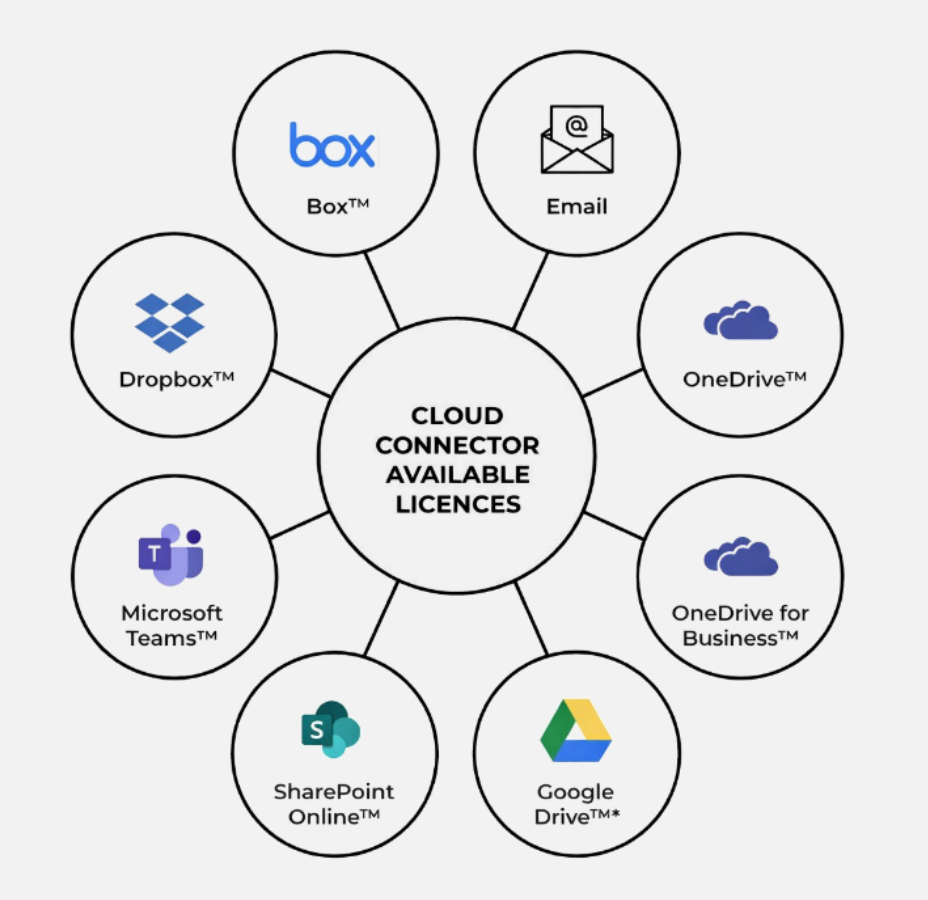
- Direct integration with popular cloud platforms including Microsoft OneDrive, SharePoint Online, Teams, Google Drive, Dropbox, and Box
- Maximise efficiency by printing and scanning a range of file formats including PDF, HTML, JPEG, PNG, Google spreadsheets and more.
- Secure user authentication with PIN codes
- Print documents from the cloud or scan directly to it
- No additional hardware, servers, or client software required
- Flexible licensing per cloud service, tailored to your business needs
Why Choose Cloud Connector?
Cloud Connector removes the complexity from document workflows, giving your teams instant access to their files wherever they are stored. It’s the ideal solution for businesses looking to embrace cloud working without the cost or overhead of traditional print management systems.
Speak to our sales team today to discuss how Cloud Connector can boost your organisations efficiency
Testimonials

PaperCut We’ve been extremely pleased with the support provided for our PaperCut setup. The team has been responsive, knowledgeable, and proactive, ensuring everything runs smoothly with minimal disruption. Their guidance has made managing printing across the school straightforward and reliable.
Preparatory school, Berkshire - PaperCut
Since switching to Papercut MF with help of AirCopiers, we have had nothing but smooth support and great service from Harry and the support team. They go out of their way to help us with little wait time, picking up support requests swiftly to make sure we get back up and running as soon as possible. Thank you for all you supply and the support too!