

Service Support

Our aim is to provide a fairer, more personal approach to service support.


Air Copier Systems provide comprehensive service support for Canon, Konica Minolta, Develop , HP and Lexmark office equipment nationwide.


As well as our support agreements, we also offer service on a time and materials basis. Through our own engineers, manufacturer support and network of trusted independent specialists we are able to offer service support nationwide.



Give us a call!

If you are unhappy with your current service provider, why not give us a call to discuss moving your service to us?

Service support: 0333 370 1524

This is a paragraph. Writing in paragraphs lets visitors find what they are looking for quickly and easily.

Learn more Learn more

This is a paragraph. Writing in paragraphs lets visitors find what they are looking for quickly and easily.

This is a paragraph. Writing in paragraphs lets visitors find what they are looking for quickly and easily.

Learn more

This is a paragraph. Writing in paragraphs lets visitors find what they are looking for quickly and easily.

Learn more

This is a paragraph. Writing in paragraphs lets visitors find what they are looking for quickly and easily.

Learn more

Company Name

Manufacturer trained technicians

Only genuine parts and toner used

Capped cost per copy increases

No minimum contract term

Contract termination without penalty

FAQs


Below is a list of questions our service department is frequently asked.

General

  • What areas do you cover?

    We provide nationwide coverage across the UK.

  • Do you offer service contracts?

    Yes, we pride ourselves on service contracts that are clean and transparent.

  • Do you supply second hand equipment?

    Yes, we can supply second-hand equipment fully tested and professionally reconditioned to ensure they meet high performance and reliability standards.

  • When will I receive my toner?

    We have a DPD cutoff of around 15:00 so any toners logged before this time are

    sent on a next working day delivery.

  • What do I do with my empty toners or full waste toner box?

    All empty toners and full waste toner boxes are disposed of by yourselves in general waste.

  • Why am I receiving emails asking for meter readings?

    If you have received an email asking for meter readings it means that your remote monitoring has either stopped working or is not setup yet.

Canon

  • What are the benefits of choosing a Canon photocopier?

    Canon photocopiers are known for their reliability, high print quality and user-

    friendly interfaces. They offer advanced features such as secure printing, cloud 

    connectivity and efficient scanning making them ideal for modern workplaces of

    all sizes.

  • Do you provide maintenance and support?

    The default CE password for a Konica Minolta bizhub is 9272927292729272, for the bizhub C3350/C3850 it is 92729272.

  • Do Canon photocopiers support cloud print and scan?

    Yes, modern Canon devices support cloud services like OneDrive, SharePoint and Google Drive via solutions such as uniFLOW Online, Papercut MF and Canon Cloud Connector.

  • Can Canon photocopiers track usage and costs?

    Yes, with software like uniFLOW Online and Papercut you can track print, copy, and scan usage by user or department helping with cost control and client billing.

Konica Minolta / Develop / Olivetti

  • What are the benefits of choosing a Konica Minolta photocopier?

    Konica Minolta photocopiers are known for their high-quality output, intuitive touchscreen interfaces and strong reliability. Their devices are particularly well regarded for office productivity offering fast print speeds, excellent colour accuracy and flexible document handling.

  • Do you provide maintenance and support?

    Yes, we offer full service agreements including remote monitoring, preventative

    maintenance, and rapid response support to minimise downtime.

  • Are Konica Minolta photocopiers energy efficient?

    Yes, Konica Minolta devices are designed with eco-friendly features such as low

    power consumption, sleep modes, and reduced toner usage to help lower

    running costs and environmental impact.

  • Can Konica Minolta photocopiers track usage and costs?

    Yes, with solutions like PaperCut MF and Papercut Hive, you can monitor usage by user, department, or client—helping control costs and support billing processes.

Remote Support 


 Start a remote support session with us 


If a technician has requested a remote support session with you, please download and run the relevant AnyDesk client below on the affected computer or server. 


Please note: When installing AnyDesk on a Mac you will have to give it permission under your system preferences - Security Permissions on macOS . If you are unsure please ask and we can guide you. 

Then let your technician know you the ID that has been assigned to your PC:.

This is an example: Please advise the actual code shown on your computer.
AnyDesk provides a temporary secure remote connection enabling us to remotely view or control your desktop. Once the app is closed the connection is terminated, we can only access the computer with your permission whilst the app is running.


The AnyDesk app can be kept and re-used for future support issues and run on several PCs/servers at the same time if required.


If you require assistance with installing AnyDesk please call us on 0333 370 1524.


Further information about AnyDesk can be found on their website

Meter Readings


If you are unsure how to get the meter readings from you copier please select the relevant guide below.

Your copiers make, range and model number can be found on its front door or control panel.


Konica / Develop / Olivetti:

Konica, Develop, Olivetti Meter Readings.pdf

Lexmark:

➥ Coming Soon

If you are still having difficulties in getting the meter reading from your copier please call us on 0345 319 5000


We do provide remote monitoring free of charge for any customers that have service contracts with us, if this is something you would be interested in please contact it.support@aircopiers.co.uk so we can arrange to set this up

Remote Monitoring


We provide remote monitoring free of charge to all our customers that take out a service agreement with us.

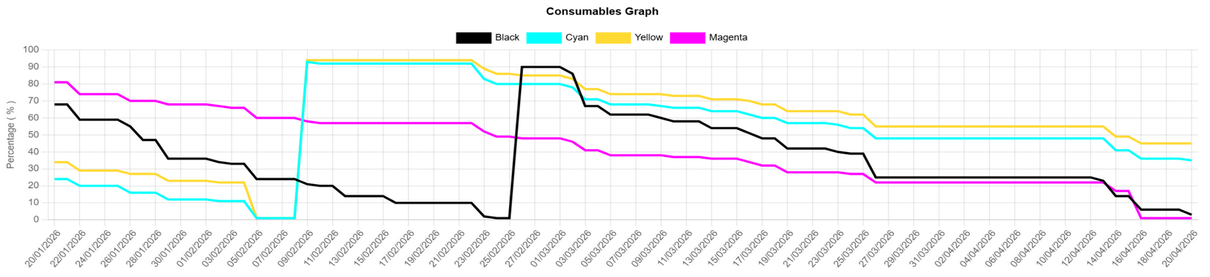
Remote monitoring enables your photocopier to order toners automatically when they are low for you to receive before they run out meaning ease of mind and less down time for your organisation. Your photocopier will also send us meter readings automatically each month ensuring you only get billed for the usage you do, removing any human error and the need for someone to provide them over the phone at the end of each month.

  • Canon

    All Canon photocopiers and printers come with Canon's eMaintenance embedded directly on the device, removing the need for any software to be installed on a server or workstation within your organisation.


    • Automatic Toner Ordering - Based on usage, the software automatically orders replacement toner when 14 days of supply remains.
    • Automatic Meter Readings - Submitted monthly and 100% accurate so you are only billed for the prints you've actually made that month.
    • Smart Sensors - Monitor consumption rates for all major parts, allowing our engineers to arrive prepared with the right components increasing first time fixes and reducing return visits.
    • Remote Screen Access - Service technicians can connect remotely to your device and view the control panel in real time, providing instant support without the need for a site visit.
    • Complete Security & Encryption - Fully compliant with zero trust environments keeping your data safe at all times.

    For questions or to request our security white papers, please contact our IT team at

    it.support@aircopiers.co.uk

  • All Other Manufacturers

    For all other manufacturers we supply and service we use a third-party software called PIPS. This requires installation on a server or workstation within the same network as the devices being monitored.


    Once installed and running PIPS will automatically order replacement toner when levels reach 25% remaining ensuring replacements arrive before cartridges run out and avoiding any unnecessary downtime.


    A web portal allows us to see the current + historic toner levels along with a full replacement history, allowing our team to proactively manage your devices.


    If you have any questions or would like more information on PIPS please contact our IT

    Team – it.support@aircopiers.co.uk